
HOTSPOT
-
You have a Microsoft 365 E5 tenant.
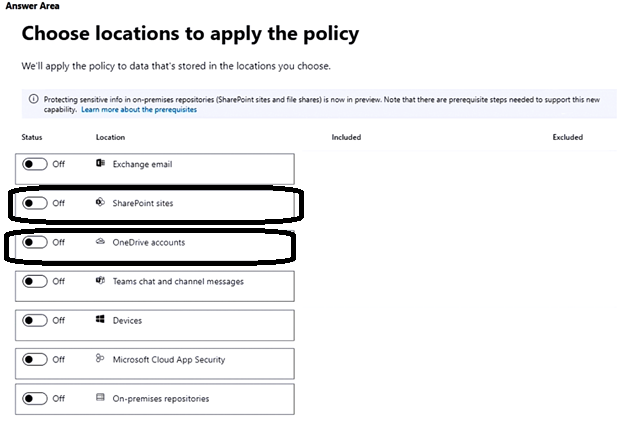
You create a data loss prevention (DLP) policy to prevent users from using Microsoft Teams to share internal documents with external users.
To which two locations should you apply the policy? To answer, select the appropriate locations in the answer area.
NOTE: Each correct selection is worth one point.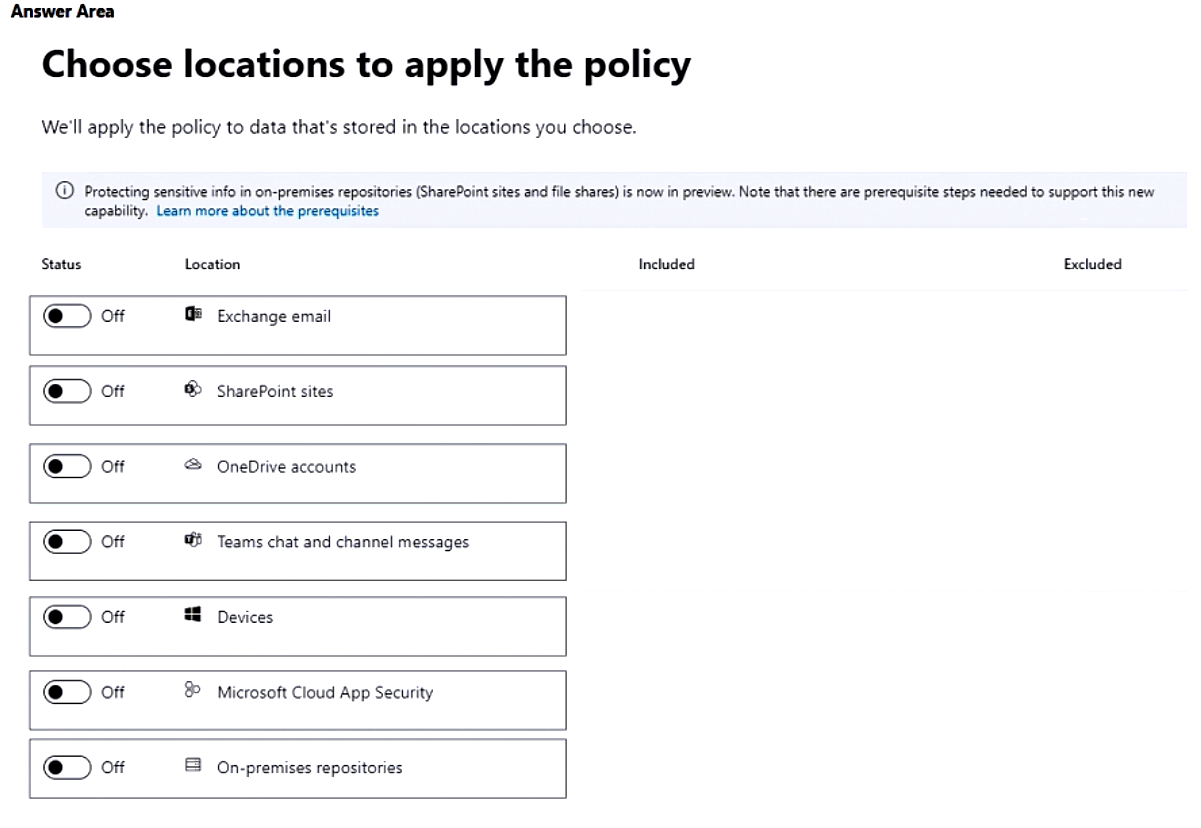
Correct Answer:
HOTSPOT
-
You have a Microsoft 365 E5 tenant that contains a Microsoft SharePoint site named Site1. Site1 contains the files shown in the following table.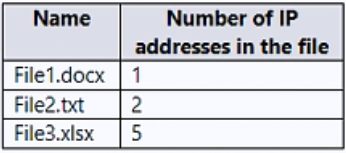
You create a sensitivity label named Sensitivity1 and an auto-label policy that has the following configurations:
• Name: AutoLabel1
• Label to auto-apply: Sensitivity1
• Choose locations where you want to apply the label: Site1
The Define content that contains sensitive info settings for AutoLabel1 is shown in the following exhibit.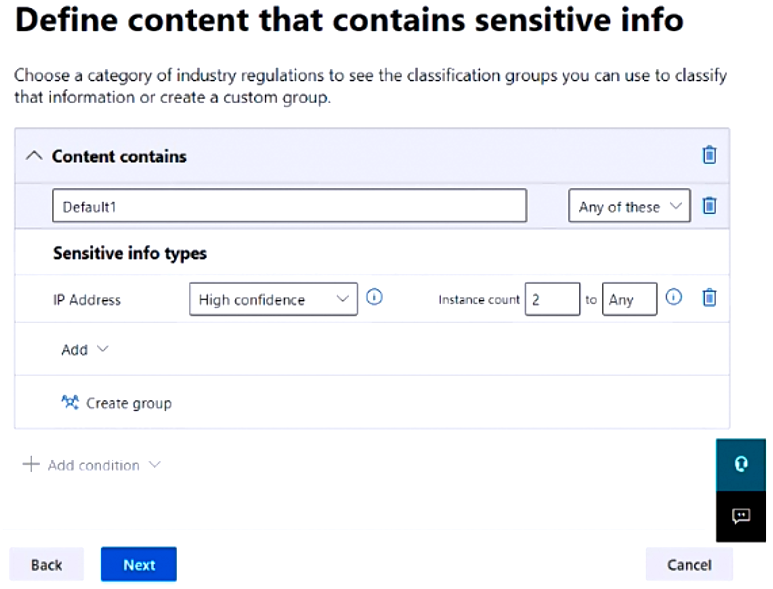
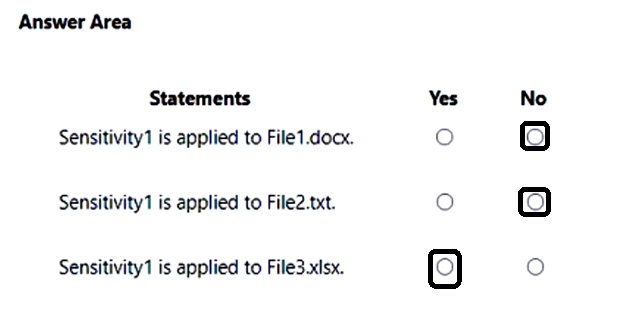
For each of the following statements, select Yes if the statement is true. Otherwise, select No.
NOTE: Each correct selection is worth one point.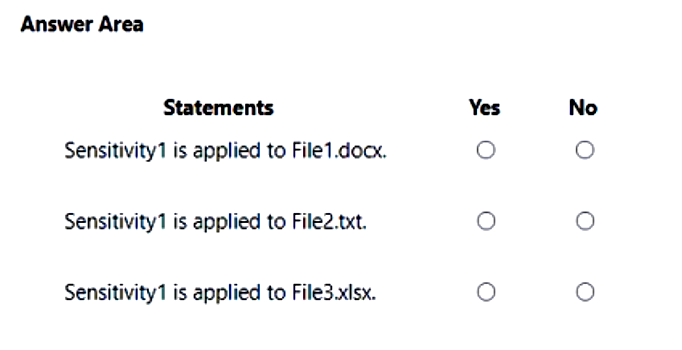
Correct Answer:
HOTSPOT
-
You have a Microsoft 365 E5 subscription that contains a Microsoft SharePoint site named Site1. Site1 contains the files shown in the following table.
You have a data loss prevention (DLP) policy named DLP1 that has the advanced DLP rules shown in the following table.
You apply DLP1 to Site1.
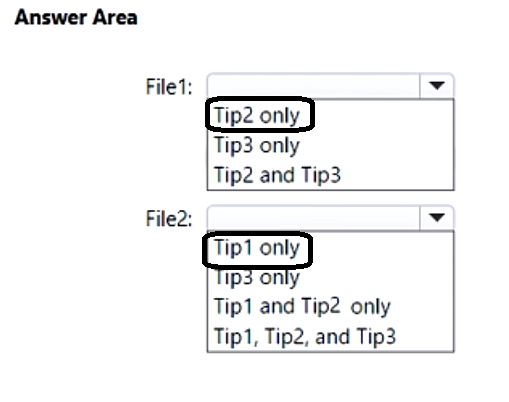
Which policy tip is displayed for each file? To answer, select the appropriate options in the answer area.
NOTE: Each correct selection is worth one point.
Correct Answer:
Overview -
Fabrikam, Inc. is an electronics company that produces consumer products. Fabrikam has 10,000 employees worldwide.
Fabrikam has a main office in London and branch offices in major cities in Europe, Asia, and the United States.
Existing Environment -
Active Directory Environment -
The network contains an Active Directory forest named fabrikam.com. The forest contains all the identities used for user and computer authentication. Each department is represented by a top-level organizational unit (OU) that contains several child OUs for user accounts and computer accounts.
All users authenticate to on-premises applications by signing in to their device by using a UPN format of username@fabrikam.com.
Fabrikam does NOT plan to implement identity federation.
Network Infrastructure -
Each office has a high-speed connection to the Internet.
Each office contains two domain controllers. All domain controllers are configured as DNS servers.
The public zone for fabrikam.com is managed by an external DNS server.
All users connect to an on-premises Microsoft Exchange Server 2016 organization. The users access their email by using Outlook Anywhere, Outlook on the web, or the Microsoft Outlook app for iOS. All the Exchange servers have the latest cumulative updates installed.
All shared company documents are stored on a Microsoft SharePoint Server farm.
Requirements -
Planned Changes -
Fabrikam plans to implement a Microsoft 365 Enterprise subscription and move all email and shared documents to the subscription.
Fabrikam plans to implement two pilot projects:
• Project1: During Project1, the mailboxes of 100 users in the sales department will be moved to Microsoft 365.
• Project2: After the successful completion of Project1, Microsoft Teams will be enabled in Microsoft 365 for the sales department users.
Fabrikam plans to create a group named UserLicenses that will manage the allocation of all Microsoft 365 bulk licenses.
Technical Requirements -
Fabrikam identifies the following technical requirements:
• All users must be able to exchange email messages successfully during Project1 by using their current email address.
• Users must be able to authenticate to cloud services if Active Directory becomes unavailable.
• A user named User1 must be able to view all DLP reports from the Microsoft Purview compliance portal.
• Microsoft 365 Apps for enterprise applications must be installed from a network share only.
• Disruptions to email access must be minimized.
Application Requirements -
Fabrikam identifies the following application requirements:
• An on-premises web application named App1 must allow users to complete their expense reports online. App1 must be available to users from the My Apps portal.
• The installation of feature updates for Microsoft 365 Apps for enterprise must be minimized.
Security Requirements -
Fabrikam identifies the following security requirements:
• After the planned migration to Microsoft 365, all users must continue to authenticate to their mailbox and to SharePoint sites by using their UPN.
• The membership of the UserLicenses group must be validated monthly. Unused user accounts must be removed from the group automatically.
• After the planned migration to Microsoft 365, all users must be signed in to on-premises and cloud-based applications automatically.
• The principle of least privilege must be used.
You are evaluating the required processes for Project1.
You need to recommend which DNS record must be created while adding a domain name for the project.
Which DNS record should you recommend?
Correct Answer:
A
🗳️
Note: This question is part of a series of questions that present the same scenario. Each question in the series contains a unique solution that might meet the stated goals. Some question sets might have more than one correct solution, while others might not have a correct solution.
After you answer a question in this section, you will NOT be able to return to it. As a result, these questions will not appear in the review screen.
You have a Microsoft 365 E5 subscription.
You create an account for a new security administrator named SecAdmin1.
You need to ensure that SecAdmin1 can manage Microsoft Defender for Office 365 settings and policies for Microsoft Teams, SharePoint, and OneDrive.
Solution: From the Microsoft Entra admin center, you assign SecAdmin1 the Teams Administrator role.
Does this meet the goal?
Correct Answer:
B
🗳️
HOTSPOT
-
Overview
-
Litware, Inc. is a consulting company that has a main office in Montreal and a branch office in Seattle.
Litware collaborates with a third-party company named A. Datum Corporation.
Environment
-
On-Premises Environment
-
The network of Litware contains an Active Directory domain named litware.com. The domain contains three organizational units (OUs) named LitwareAdmins, Montreal Users, and Seattle Users and the users shown in the following table.
The domain contains 2,000 Windows 10 Pro devices and 100 servers that run Windows Server 2019.
Cloud Environment
-
Litware has a pilot Microsoft 365 subscription that includes Microsoft Office 365 Enterprise E3 licenses and Azure AD Premium P2 licenses.
The subscription contains a verified DNS domain named litware.com.
Azure AD Connect is installed and has the following configurations:
• Password hash synchronization is enabled.
• Synchronization is enabled for the LitwareAdmins OU only.
Users are assigned the roles shown in the following table.
Self-service password reset (SSPR) is enabled.
The Azure AD tenant has Security defaults enabled.
Problem Statements
-
Litware identifies the following issues:
• Admin1 cannot create conditional access policies.
• Admin4 receives an error when attempting to use SSPR.
• Users access new Office 365 service and feature updates before the updates are reviewed by Admin2.
Requirements
-
Planned Changes
-
Litware plans to implement the following changes:
• Implement Microsoft Intune.
• Implement Microsoft Teams.
• Implement Microsoft Defender for Office 365.
• Ensure that users can install Office 365 apps on their device.
• Convert all the Windows 10 Pro devices to Windows 10 Enterprise ES.
• Configure Azure AD Connect to sync the Montreal Users OU and the Seattle Users OU.
Technical Requirements
-
Litware identifies the following technical requirements:
• Administrators must be able to specify which version of an Office 365 desktop app will be available to users and to roll back to previous versions.
• Only Admin2 must have access to new Office 365 service and feature updates before they are released to the company.
• Litware users must be able to invite A. Datum users to participate in the following activities:
• Join Microsoft Teams channels.
• Join Microsoft Teams chats.
• Access shared files.
• Just in time access to critical administrative roles must be required.
• Microsoft 365 incidents and advisories must be reviewed monthly.
• Office 365 service status notifications must be sent to Admin2.
• The principle of least privilege must be used.
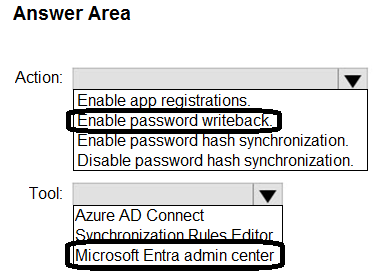
You need to ensure that Admin4 can use SSPR.
Which tool should you use, and which action should you perform? To answer, select the appropriate options in the answer area.
NOTE: Each correct selection is worth one point.
Correct Answer:
HOTSPOT
-
Overview
-
Litware, Inc. is a consulting company that has a main office in Montreal and a branch office in Seattle.
Litware collaborates with a third-party company named A. Datum Corporation.
Environment
-
On-Premises Environment
-
The network of Litware contains an Active Directory domain named litware.com. The domain contains three organizational units (OUs) named LitwareAdmins, Montreal Users, and Seattle Users and the users shown in the following table.
The domain contains 2,000 Windows 10 Pro devices and 100 servers that run Windows Server 2019.
Cloud Environment
-
Litware has a pilot Microsoft 365 subscription that includes Microsoft Office 365 Enterprise E3 licenses and Azure AD Premium P2 licenses.
The subscription contains a verified DNS domain named litware.com.
Azure AD Connect is installed and has the following configurations:
• Password hash synchronization is enabled.
• Synchronization is enabled for the LitwareAdmins OU only.
Users are assigned the roles shown in the following table.
Self-service password reset (SSPR) is enabled.
The Azure AD tenant has Security defaults enabled.
Problem Statements
-
Litware identifies the following issues:
• Admin1 cannot create conditional access policies.
• Admin4 receives an error when attempting to use SSPR.
• Users access new Office 365 service and feature updates before the updates are reviewed by Admin2.
Requirements
-
Planned Changes
-
Litware plans to implement the following changes:
• Implement Microsoft Intune.
• Implement Microsoft Teams.
• Implement Microsoft Defender for Office 365.
• Ensure that users can install Office 365 apps on their device.
• Convert all the Windows 10 Pro devices to Windows 10 Enterprise ES.
• Configure Azure AD Connect to sync the Montreal Users OU and the Seattle Users OU.
Technical Requirements
-
Litware identifies the following technical requirements:
• Administrators must be able to specify which version of an Office 365 desktop app will be available to users and to roll back to previous versions.
• Only Admin2 must have access to new Office 365 service and feature updates before they are released to the company.
• Litware users must be able to invite A. Datum users to participate in the following activities:
• Join Microsoft Teams channels.
• Join Microsoft Teams chats.
• Access shared files.
• Just in time access to critical administrative roles must be required.
• Microsoft 365 incidents and advisories must be reviewed monthly.
• Office 365 service status notifications must be sent to Admin2.
• The principle of least privilege must be used.
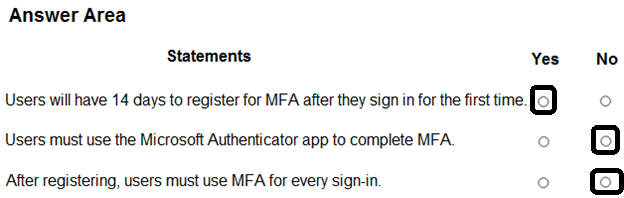
You are evaluating the use of multi-factor authentication (MFA).
For each of the following statements, select Yes if the statement is true. Otherwise, select No.
NOTE: Each correct selection is worth one point.
Correct Answer:
Overview -
Litware, Inc. is a consulting company that has a main office in Montreal and a branch office in Seattle.
Litware collaborates with a third-party company named A. Datum Corporation.
Environment -
On-Premises Environment -
The network of Litware contains an Active Directory domain named litware.com. The domain contains three organizational units (OUs) named LitwareAdmins, Montreal Users, and Seattle Users and the users shown in the following table.
The domain contains 2,000 Windows 10 Pro devices and 100 servers that run Windows Server 2019.
Cloud Environment -
Litware has a pilot Microsoft 365 subscription that includes Microsoft Office 365 Enterprise E3 licenses and Azure AD Premium P2 licenses.
The subscription contains a verified DNS domain named litware.com.
Azure AD Connect is installed and has the following configurations:
• Password hash synchronization is enabled.
• Synchronization is enabled for the LitwareAdmins OU only.
Users are assigned the roles shown in the following table.
Self-service password reset (SSPR) is enabled.
The Azure AD tenant has Security defaults enabled.
Problem Statements -
Litware identifies the following issues:
• Admin1 cannot create conditional access policies.
• Admin4 receives an error when attempting to use SSPR.
• Users access new Office 365 service and feature updates before the updates are reviewed by Admin2.
Requirements -
Planned Changes -
Litware plans to implement the following changes:
• Implement Microsoft Intune.
• Implement Microsoft Teams.
• Implement Microsoft Defender for Office 365.
• Ensure that users can install Office 365 apps on their device.
• Convert all the Windows 10 Pro devices to Windows 10 Enterprise ES.
• Configure Azure AD Connect to sync the Montreal Users OU and the Seattle Users OU.
Technical Requirements -
Litware identifies the following technical requirements:
• Administrators must be able to specify which version of an Office 365 desktop app will be available to users and to roll back to previous versions.
• Only Admin2 must have access to new Office 365 service and feature updates before they are released to the company.
• Litware users must be able to invite A. Datum users to participate in the following activities:
• Join Microsoft Teams channels.
• Join Microsoft Teams chats.
• Access shared files.
• Just in time access to critical administrative roles must be required.
• Microsoft 365 incidents and advisories must be reviewed monthly.
• Office 365 service status notifications must be sent to Admin2.
• The principle of least privilege must be used.
You need to configure just in time access to meet the technical requirements.
What should you use?
Correct Answer:
B
🗳️
You have a Microsoft 365 subscription that contains an Azure AD tenant named contoso.com. The tenant includes a user named User1.
You enable Azure AD Identity Protection.
You need to ensure that User1 can review the list in Azure AD Identity Protection of users flagged for risk. The solution must use the principle of least privilege.
To which role should you add User1?
Correct Answer:
B
🗳️
You have a Microsoft 365 subscription that contains an Azure AD tenant named contoso.com. The tenant includes a user named User1.
You enable Azure AD Identity Protection.
You need to ensure that User1 can review the list in Azure AD Identity Protection of users flagged for risk. The solution must use the principle of least privilege.
To which role should you add User1?
Correct Answer:
B
🗳️
 Viewing page 24 out of 39 pages.

By buying Contributor Access for yourself, you will gain the following features:


 1 Month 2.58 / day
All Questions for 1 Exam
Inline Discussions
No Captcha / Robot Checks
Includes New Updates
1 Month 2.58 / day
All Questions for 1 Exam
Inline Discussions
No Captcha / Robot Checks
Includes New Updates
 3 Months 1.76 / day
All Questions for 1 Exam
Inline Discussions
No Captcha / Robot Checks
Includes New Updates
3 Months 1.76 / day
All Questions for 1 Exam
Inline Discussions
No Captcha / Robot Checks
Includes New Updates
