
You have a Microsoft 365 subscription and use Microsoft Defender for Office 365.
You need to create a policy to ensure that any email messages containing an attachment that has the .extl extension is quarantined for inspection.
Which type of policy should you create?
Correct Answer:
D
🗳️
HOTSPOT
-
You have a Microsoft 365 E5 subscription that contains the groups shown in the following table.
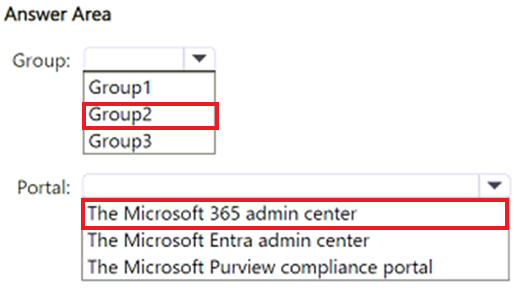
You plan to create 10 new users and configure group-based licensing to assign each user a Microsoft 365 E5 license.
To which group should you add the users, and which portal should you use to assign the license? To answer, select the appropriate options in the answer area.
NOTE: Each correct selection is worth one point.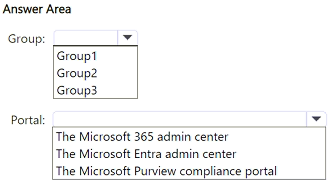
Correct Answer:
HOTSPOT
-
You have a Microsoft 365 E5 subscription that contains a Windows 11 device named Device1.
Device1 is onboarded to Microsoft Defender for Endpoint.
You need to ensure that Device1 is blocked from connecting to IP address 131.107.10.15.
What should you configure in the Microsoft Defender Endpoint settings? To answer, select the appropriate settings in the answer area.
NOTE: Each correct selection is worth one point.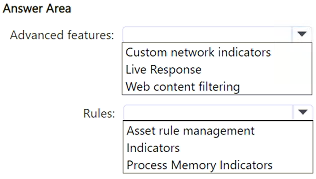
Correct Answer:

HOTSPOT
-
You have a Microsoft 365 E5 subscription that contains the users shown in the following table.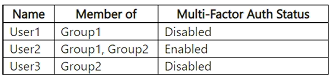
You configure a Multifactor authentication registration policy that has the following settings:
• Assignments:
o Include: Group1
o Exclude: Group2
• Controls: Require Microsoft Entra ID multifactor authentication registration
• Policy enforcement: Enabled
You create a conditional access policy that has the following settings:
• Name: Policy1
• Assignments:
o Include: Group2
o Exclude: Group1
• Grant: Require multifactor authentication
• Enable policy: On
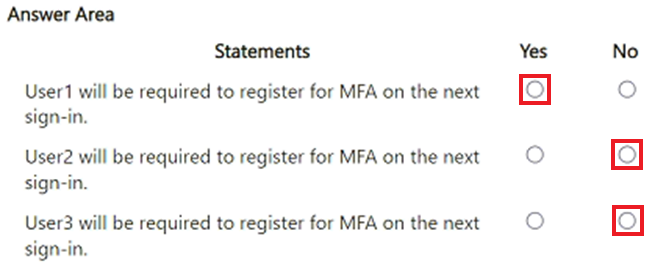
For each of the following statements, select Yes if the statement is true. Otherwise, select No.
NOTE: Each correct selection is worth one point.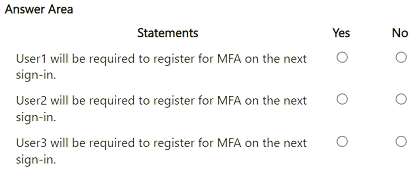
Correct Answer:
HOTSPOT
-
Your company has offices in Montreal, Seattle, and New York City.
You have a Microsoft 365 E5 subscription that contains the users shown in the following table.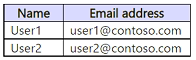
The offices have the IP addresses shown in the following table.
From Microsoft Defender for Cloud Apps, you create the activity policy shown in the following exhibit.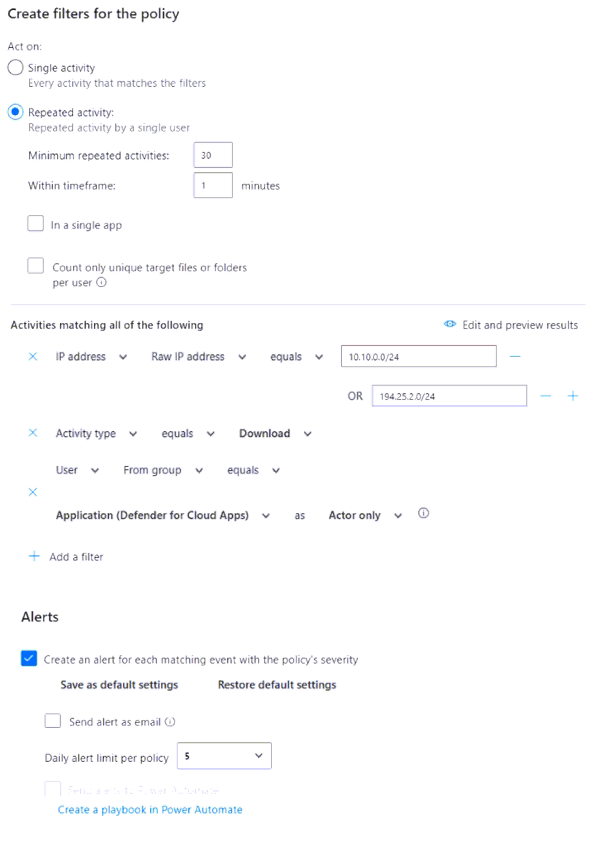
For each of the following statements, select Yes if the statement is true. Otherwise, select No.
NOTE: Each correct selection is worth one point.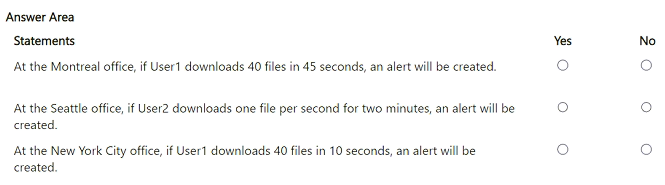
Correct Answer:

You have a Microsoft 365 E5 subscription that contains a user named User1.
You create an anti-phishing policy named Policy1 that has the following settings:
• Include these users, groups and domains: User1
• Phishing email threshold: 3 - More Aggressive
User1 receives the email messages shown in the following table.
Which messages are phishing email?
Correct Answer:
C
🗳️
HOTSPOT
-
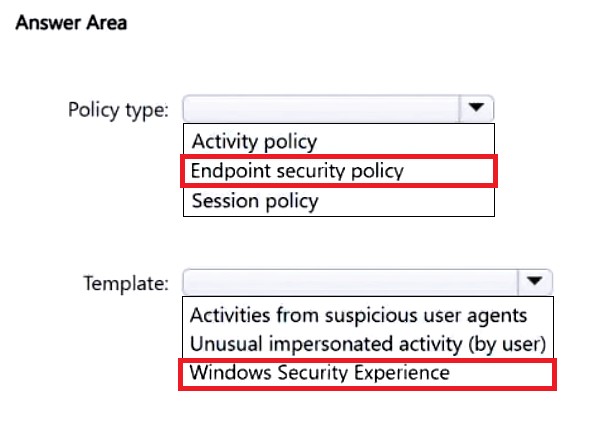
You have a Microsoft 365 E5 subscription and use Microsoft Defender for Endpoint. The subscription contains Windows 11 devices.
You need to create a policy to restrict users from accessing the Device security settings and the Account protection settings in Windows Defender Security Center on the devices.
Which type of policy should you create, and which template should you use? To answer, select the appropriate options in the answer area.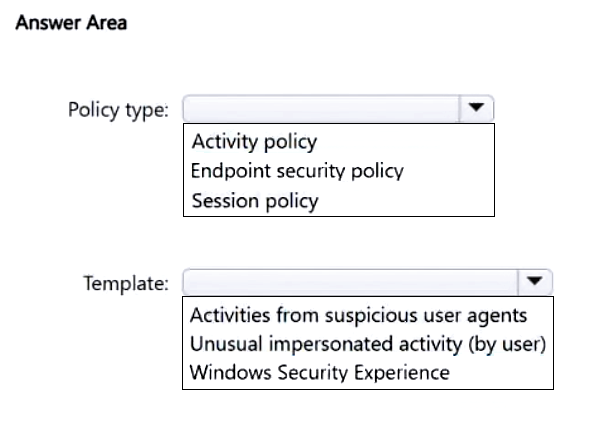
Correct Answer:
You have a Microsoft 365 subscription that uses Microsoft Defender for Endpoint.
All the devices in your organization are onboarded to Microsoft Defender for Endpoint.
You need to ensure that an alert is generated if malicious activity was detected on a device during the last 24 hours.
What should you do?
Correct Answer:
D
🗳️
You have a Microsoft 365 subscription that includes Microsoft Defender XDR.
From the Microsoft Defender portal, you review the Microsoft Secure Score improvement actions shown in the following table.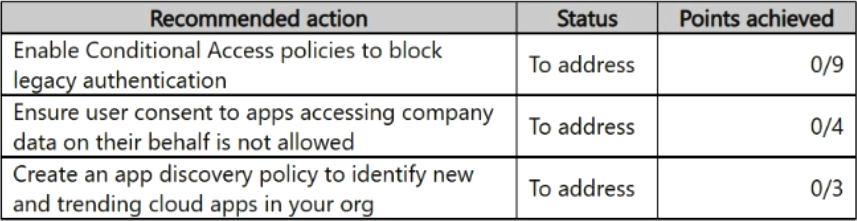
You plan to update the status of the improvement actions as shown in the following table.
How many points will the Secure Score increase after the update?
Correct Answer:
B
🗳️
You have a Microsoft 365 E5 subscription that uses Microsoft Defender for Endpoint and Microsoft Intune.
All devices run Windows 11 and are Microsoft Entra joined.
You are alerted to a zero-day attack.
You need to identify which devices were affected by the attack and send a request to Intune administrators to update the affected devices.
Which two actions should you perform in the Microsoft Defender portal? Each correct answer presents part of the solution.
NOTE: Each correct selection is worth one point.
Correct Answer:
AD
🗳️
 Viewing page 37 out of 39 pages.

By buying Contributor Access for yourself, you will gain the following features:


 1 Month 2.58 / day
All Questions for 1 Exam
Inline Discussions
No Captcha / Robot Checks
Includes New Updates
1 Month 2.58 / day
All Questions for 1 Exam
Inline Discussions
No Captcha / Robot Checks
Includes New Updates
 3 Months 1.76 / day
All Questions for 1 Exam
Inline Discussions
No Captcha / Robot Checks
Includes New Updates
3 Months 1.76 / day
All Questions for 1 Exam
Inline Discussions
No Captcha / Robot Checks
Includes New Updates
