
You are reviewing alerts in the Microsoft 365 Defender portal.
How long are the alerts retained in the portal?
You have a Microsoft 365 E5 subscription.
From the Microsoft 365 Defender portal, you plan to export a detailed report of compromised users.
What is the longest time range that can be included in the report?
Correct Answer:
A
🗳️
HOTSPOT -
You have a Microsoft 365 subscription.
You deploy the anti-phishing policy shown in the following exhibit.
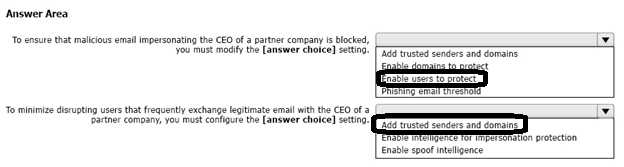
Use the drop-down menus to select the answer choice that completes each statement based on the information presented in the graphic.
NOTE: Each correct selection is worth one point.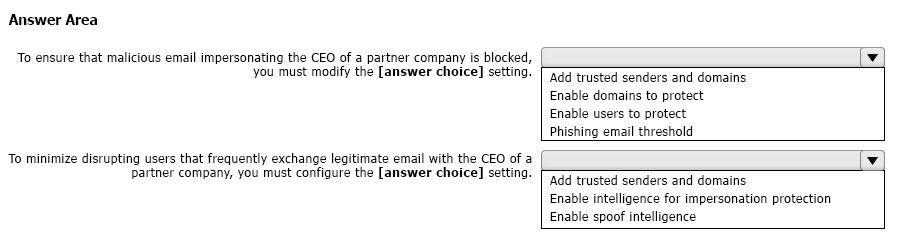
Correct Answer:
HOTSPOT -
You use Microsoft Defender for Endpoint.
You have the Microsoft Defender for Endpoint device groups shown in the following table.
You plan to onboard computers to Microsoft Defender for Endpoint as shown in the following table.
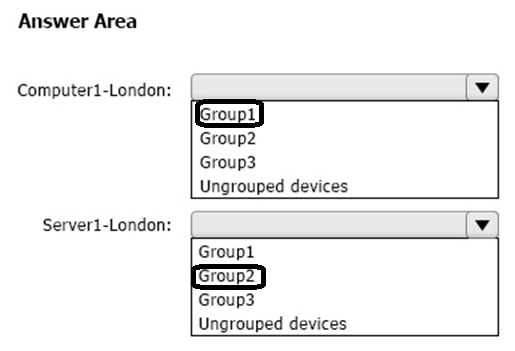
To which device group will each computer be added? To answer, select the appropriate options in the answer area.
NOTE: Each correct selection is worth one point.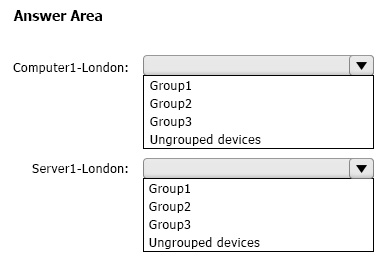
Correct Answer:
DRAG DROP -
You have a Microsoft 365 subscription that uses Microsoft Defender for Office 365.
You need to configure policies to meet the following requirements:
Customize the common attachments filter.
Enable impersonation protection for sender domains.
Which type of policy should you configure for each requirement? To answer, drag the appropriate policy types to the correct requirements. Each policy type may be used once, more than once, or not at all. You may need to drag the split bar between panes or scroll to view content.
NOTE: Each correct selection is worth one point.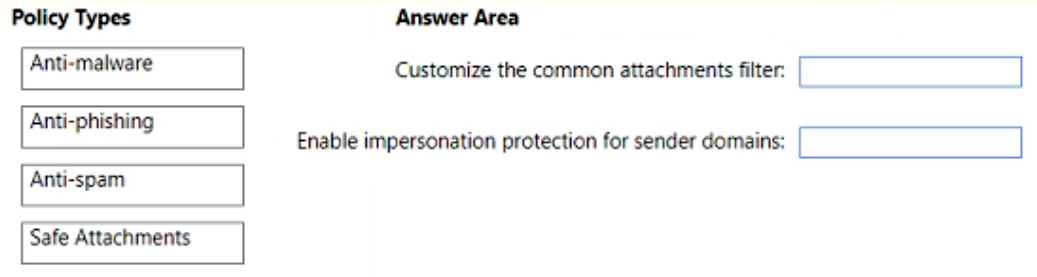
Correct Answer:

You have an Azure AD tenant and a Microsoft 365 E5 subscription. The tenant contains the users shown in the following table.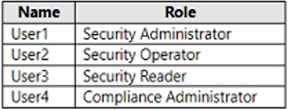
You plan to implement Microsoft Defender for Endpoint.
You verify that role-based access control (RBAC) is turned on in Microsoft Defender for Endpoint.
You need to identify which user can view security incidents from the Microsoft 365 Defender portal.
Which user should you identify?
Correct Answer:
A
🗳️
HOTSPOT -
You have a Microsoft 365 E5 subscription.
All company-owned Windows 11 devices are onboarded to Microsoft Defender for Endpoint.
You need to configure Defender for Endpoint to meet the following requirements:
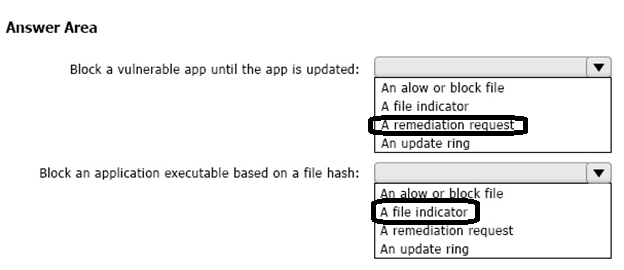
Block a vulnerable app until the app is updated.
Block an application executable based on a file hash.
The solution must minimize administrative effort.
What should you configure for each requirement? To answer, select the appropriate options in the answer area.
NOTE: Each correct selection is worth one point.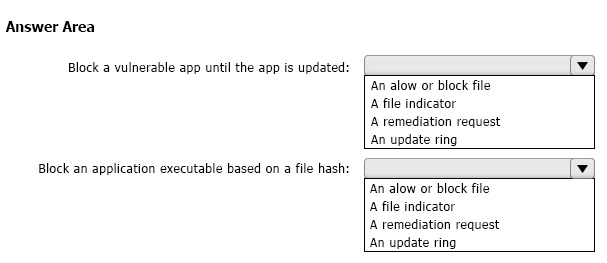
Correct Answer:
HOTSPOT -
You have a Microsoft 365 E5 subscription that uses Microsoft Defender for Endpoint and contains the devices shown in the following table.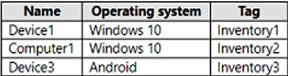
Defender for Endpoint has the device groups shown in the following table.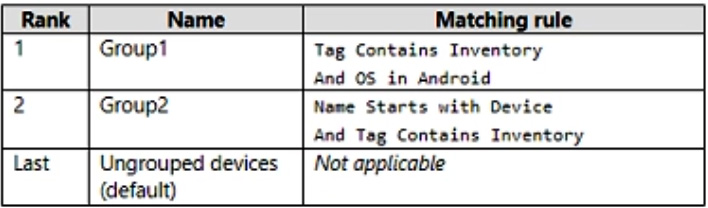
You create an incident email notification rule configured as shown in the following table.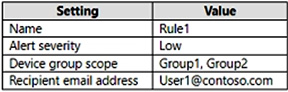
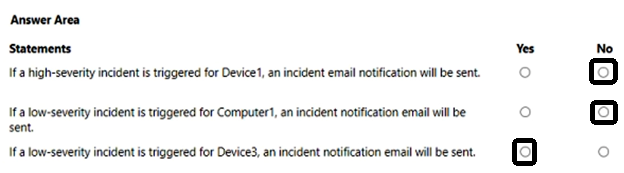
For each of the following statements, select Yes if the statement is true. Otherwise, select No.
NOTE: Each correct selection is worth one point.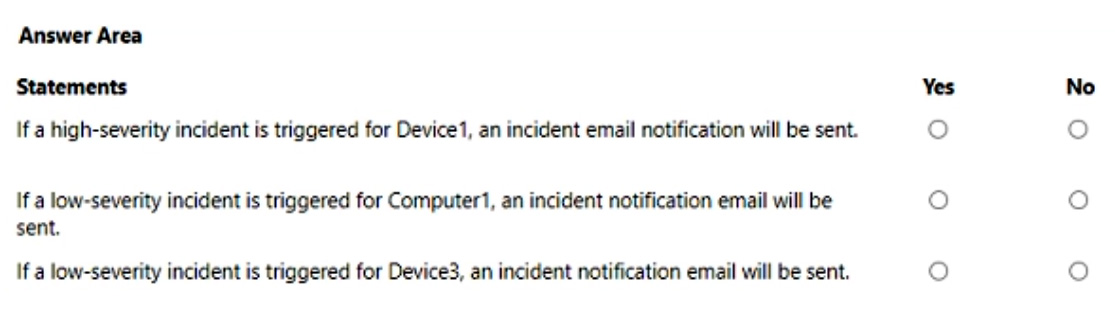
Correct Answer:
You have a Microsoft 365 tenant that contains two users named User1 and User2.
You create the alert policy shown in the following exhibit.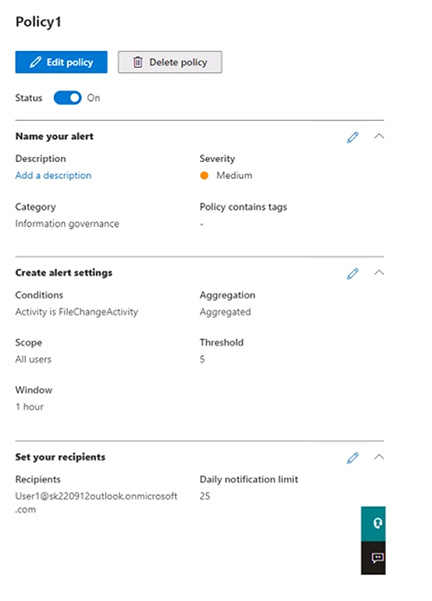
User2 runs a script that modifies a file in a Microsoft SharePoint library once every four minutes and runs for a period of two hours.
How many alerts will User1 receive?
Correct Answer:
A
🗳️
Your company has 10,000 users who access all applications from an on-premises data center.
You plan to create a Microsoft 365 subscription and to migrate data to the cloud.
You plan to implement directory synchronization.
User accounts and group accounts must sync to Azure AD successfully.
You discover that several user accounts fail to sync to Azure AD.
You need to resolve the issue as quickly as possible.
What should you do?
Correct Answer:
B
🗳️
 Viewing page 8 out of 39 pages.

By buying Contributor Access for yourself, you will gain the following features:


 1 Month 2.58 / day
All Questions for 1 Exam
Inline Discussions
No Captcha / Robot Checks
Includes New Updates
1 Month 2.58 / day
All Questions for 1 Exam
Inline Discussions
No Captcha / Robot Checks
Includes New Updates
 3 Months 1.76 / day
All Questions for 1 Exam
Inline Discussions
No Captcha / Robot Checks
Includes New Updates
3 Months 1.76 / day
All Questions for 1 Exam
Inline Discussions
No Captcha / Robot Checks
Includes New Updates
